How to Choose DSO Dental Software in 2026
When dental support organizations (DSOs) outgrow their dental practice management software, their evaluation shifts from features to infrastructure. Growing groups in 2026 assess these key areas: multi-location practice management, specialty support, cloud imaging, revenue cycle and payments, patient engagement, AI and automation, and a unified enterprise platform with enterprise-grade security.
The common thread is whether these capabilities operate as one connected system or as a collection of disconnected point solutions because fragmentation, not any single missing feature, is what caps a DSO’s ability to scale.
This guide walks through the signs it’s time to move, the seven capability areas that belong in every evaluation, and what the switch actually involves.
What Are the Signs a DSO Has Outgrown Dental Software?
A DSO has outgrown its dental software when the organization can no longer see or run itself as one business. The symptoms are consistent across groups:
- Leadership assembles performance reporting manually, logging into separate systems or exporting spreadsheets to answer basic questions about production, collections, and scheduling.
- Every acquisition adds another practice management system, imaging platform, or billing tool instead of onboarding to an existing standard.
- Staff toggle between disconnected systems all day. The typical group juggles between five and fifteen separate platforms across practice management, imaging, billing, payments, patient engagement, and reporting.
- IT tickets, security reviews, and vendor invoices grow linearly with location count.
There’s a name for the cumulative cost of running this way: process debt, or the hidden cost of disconnected workflows and legacy systems. Each new location multiplies the manual handoffs, the reconciliation work, and the revenue that leaks between systems.
“Most dental enterprises are managing 2026 ambitions on 2010 infrastructure. That gap has a cost. We call it process debt. And like all debt, it compounds—quietly, until it doesn’t.”—Eric Giesecke, Chief Executive Officer, Planet DDS
Groups usually feel the strain somewhere between three and ten locations, and acquisition-heavy groups feel it sooner, because every deal adds to the pile.
If two or more of those symptoms describe your organization, the question isn’t whether to re-evaluate your software. It’s what to evaluate next, and the answer is bigger than practice management alone.
What Should DSOs Look for in Dental Practice Management Software?
Choosing DSO dental software in 2026 means evaluating key capabilities together, because the gaps between them are where growing groups lose time and revenue. Here are seven key areas to consider:
1. Practice management built for multi-location operations
The core system of record has to treat the organization—not the office—as the unit of operation. That means one database across every location, centralized administration, cross-location scheduling for providers who split time between offices, and role-based access that can be managed once rather than office by office.
What to look for: A single patient record that follows the patient across locations, and enterprise reporting that rolls up production, collections, case acceptance, and accounts receivable in real time without manual consolidation. This is the standard that cloud-based dental practice management software like Denticon was built around—purpose-built for groups and DSOs rather than adapted from single-practice roots.
2. Specialty and multi-specialty support
Groups adding orthodontics, pediatric dentistry, or oral surgery discover quickly that general-dentistry software handles specialty workflows inefficiently. Ortho alone brings contract-based billing, treatment phases spanning years, and responsible-party arrangements that general PMS platforms weren’t designed for.
What to look for: Specialty practice management that runs specialty workflows natively and shares patient and financial data with the rest of the organization instead of operating as an island. For orthodontic groups and OSOs, orthodontic practice management software like Cloud 9 handles financial arrangements, autopay, and claims workflows built specifically for ortho at scale.
3. Cloud-based imaging that follows the patient
Server-based imaging means hardware in every office, storage costs that grow with every X-ray, and images that don’t travel when patients do. At multi-location scale, it also means an inconsistent security posture across sites.
What to look for: Device-agnostic capture that works with your existing sensors, DICOM-standard storage, unlimited cloud capacity, secure sharing for referrals, and AI analysis embedded in the diagnostic workflow. Cloud-based dental imaging software such as Apteryx pairs open device architecture with FDA-cleared AI overlays. Practices using AI-assisted imaging see case acceptance improve by up to 30%.
4. Revenue cycle management (RCM) and integrated payments
Revenue cycle is the largest hidden leak in most dental groups. The scale of the problem is industry-wide: The 2025 DataSpring Index, powered by CAQH, found the dental industry spent roughly $6.6 billion on 5.2 billion administrative transactions, with an estimated $1.9 billion in savings available by automating manual work.
Inside individual organizations, Planet DDS data puts 20% to 30% of submitted claims in denial or pending status at any given time. For a twenty-provider group, that’s meaningful revenue waiting to become a write-off.
What to look for: Organization-wide claims visibility across eligibility, submission, remittance, and patient AR, plus payments that post to the ledger automatically instead of through-manual entry. Integrated dental payment processing like Planet DDS Pay posts payments directly to the practice management system and uses point-to-point encryption, which shrinks PCI compliance scope across every location.
5. Patient engagement and self-service
Patients now expect to book online, complete intake digitally, and pay from their phone. For DSOs, the harder requirement is doing that consistently across dozens of locations with different brands, providers, and workflows.
What to look for: Self-scheduling that reads live availability from the actual schedule (not a third-party copy that requires syncing), digital forms that write structured data into the patient record, and centralized control. This allows corporate to set the standard and locations to execute with their own branding. Tools for dental patient self-scheduling and digital forms like MyTooth are built directly on the practice management data layer, which is what makes that consistency possible.
6. AI and automation in the workflow, not bolted on
Staffing pressure has turned automation from a nice-to-have into an operating requirement. In the ADA Health Policy Institute’s latest quarterly outlook, dentists named staffing shortages a top challenge for 2026 cited by 54.2% of respondents.
Meanwhile, 81% of DSO leaders say they are concerned over staffing-related issues and scaling groups losing more than $150,000 per provider per year to no-shows, largely because confirmation and recall calls are the first tasks to slip when the front desk is stretched thin.
What to look for: AI that acts inside the workflow rather than reporting from outside it. The test is simple: Does the AI complete the task and write the outcome back to the system of record automatically? AI agents for dental practices, such as the DentalOS® Confirmation and Recall Agents, make outbound calls autonomously and log every outcome to the PMS in real time. Practices using them see no-shows drop 15% to 30% while manual staff hours fall by more than half.
The same principle applies to clinical documentation (voice-driven charting) and imaging analysis: Intelligence embedded in the AI-native dental platform outperforms single-task tools working from partial data.
7. A unified dental enterprise platform: one architecture, one security framework
This is the most modern criterion on the list, and the one that determines how much value the first six deliver. Rather than assembling practice management, imaging, payments, engagement, and AI from separate vendors, a dental enterprise platform like DentalOS® runs them on one architecture, one data model, and one security framework.
The security case alone justifies it. Every additional vendor in a stack adds an audit cycle, a governance model, and an attack surface. A single platform consolidates all of it: single sign-on, multi-factor authentication, and user provisioning managed once across every product and location. Onboard a new hire once, not once per system.
What to look for: Documented certifications (SOC 2 Type 2 and HIPAA at minimum, PCI where payments apply), one governance model spanning the full stack, and open APIs backed by a real partner ecosystem, so the organization controls its own technology roadmap. Planet DDS maintains 80+ dental software integrations.
Connected Platform vs. Point Solutions: Does the Architecture Matter?
Yes. And it’s why the seventh criterion belongs to the list. Architecture determines whether the first six capabilities compound or merely coexist.
“I’ve never met a DSO leader who said their biggest problem was finding the right practice management software. They talk about visibility, scale, AI, and operational consistency across dozens of locations. They’re looking for a platform that matches the ambition of what they’ve built.”—Mike Huffaker, Chief Revenue Officer, Planet DDS
A point-solution stack connects tools through integrations: data syncs between systems, with delays, mapping errors, and finger-pointing when something breaks.
A connected platform shares one data layer: A patient record updated in the practice management system is instantly the same record as the imaging, payments, and engagement tools see. The differences show up operationally:
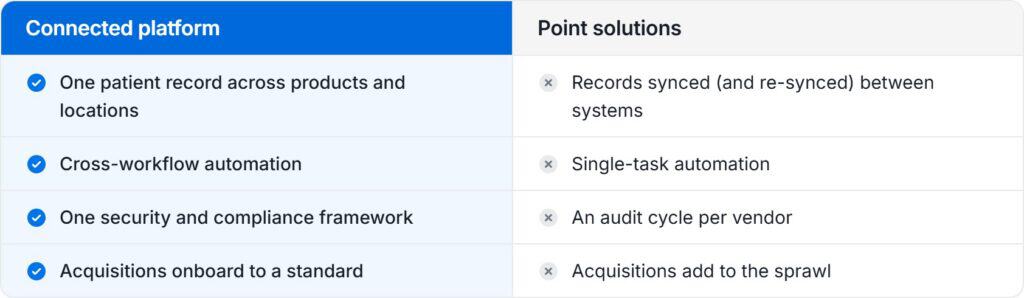
One caution: Connected should not mean “closed.” Some all-in-one suites achieve connection by eliminating choice, locking groups into whatever the vendor builds.
The evaluation question worth asking is whether a platform is both connected and open: a shared data layer underneath, open APIs, and a partner marketplace on top. That combination is what separates a true dental enterprise platform from a bundle.
There’s also a financial dimension DSO leadership shouldn’t ignore. Advisors evaluating multi-location groups increasingly price infrastructure readiness into valuations. Mature DSO platforms are benchmarked at overhead of 30% of collections, versus 40% for small groups, and buyers pay premiums for organizations that can absorb new locations without the systems breaking. The software decision is, quietly, an enterprise-value decision.
How Should DSOs Compare Dental Software Vendors?
Compare vendors by weighing the seven capability areas against your growth strategy, then pressure-testing claims in live demos. Acquisition-heavy groups should consider migration speed and onboarding standardization most heavily; groups focused on same-store growth should weigh analytics, patient engagement, and revenue cycle performance.
A few demo questions separate marketing from architecture quickly:
- “Show me one patient’s record across two locations and two specialties.” If the answer involves switching systems, the data layer isn’t shared.
- “Walk a payment from collection to ledger posting.” Count the manual steps.
- “How does a new employee get access—and lose it—across all locations?” One action or twenty is the difference between enterprise user management and administrative liability.
- “What happens to our data if we leave?” Data ownership and portability answers reveal more about a vendor than any feature list.
Red flags worth walking away from: per-location databases dressed up with a reporting layer, AI features that live in a separate tab and never write back, and “digital” forms that arrive as PDFs someone re-enters by hand.
And when comparing costs, compare total cost of ownership—subscription pricing plus server and IT overhead, manual labor hours, revenue leakage from disconnected billing, and eventual switching costs—rather than license fees alone.
What Does Migrating to New DSO Software Actually Involve?
Migration for a multi-location group is a phased program, not a weekend cutover, and it’s more predictable than most leadership teams fear. The typical sequence: data conversion and validation, a pilot at one or two locations, phased rollout across the portfolio, and then centralization of shared services like billing once locations are live.
On a unified platform, DSOs average about eight weeks per location to onboard, including newly acquired offices, which onboard to a standard rather than inheriting another stack.
Strong vendor migration support looks like dedicated data conversion with verification steps, role-based training rather than generic sessions, and per-location champions during rollout. The honest comparison isn’t switching cost versus zero; it’s switching cost versus the compounding process debt of staying put, which grows with every location added.
When Should a Growing Group Make the Software Decision?
This is earlier than most groups think, typically when the organization hits three to ten locations, and sooner for groups on an acquisition path. The reasoning is practical: Every location added to a fragmented stack raises the eventual migration cost, while every location added to a unified platform strengthens it.
Operational data compounds the same way. A group that consolidates its infrastructure at fifteen locations builds years of clean, connected performance data that a larger competitor starting later can’t recreate retroactively.
Size isn’t the barrier it used to be either. Emerging groups in the two-to-nine location range can start on the same enterprise platform infrastructure and run through programs like Planet DDS Launchpad immediately.
Choosing the Right Dental Software for Your DSO
The right dental practice management software for a scaling DSO isn’t a single product decision; it’s an infrastructure decision across all capabilities above. Groups that evaluate the pieces together, rather than a one-point solution at a time, are the ones that stop accumulating process debt and start compounding the advantages of scale.
The practical next step takes an afternoon, not a quarter: Compare your current stack against these areas. If it falls short in three or more, your organization is paying for enterprise software outcomes without getting them.
Contact us today to see how the Planet DDS DentalOS platform can transform every location into one connected system.