Planet DDS Billing Questions
How billing works at Planet DDS
This page walks you through how Planet DDS invoices are sent, how payments are processed, and where to go if you ever need a hand. If you have any questions along the way, we’re always happy to help.
How payments work
Your experience depends on whether you have auto-charge enabled. First check if you have auto-charged enabled:
Auto-charge enabled — You’re all set, nothing to do.
Your payment processes automatically each billing cycle.
- Your saved default card is charged automatically
- You’ll receive an invoice copy by email for your records—no payment link will be included
- No need to re-enter any payment information
No auto-charge — Pay by invoice each cycle
Effective May 2026, you’ll receive a secure link each billing cycle to submit your payment.
- Look out for a billing email with a secure payment link at the start of each cycle
- Select your preferred payment method and enter your details
- Your payment method will be saved as your default going forward
All billing emails will come from [email protected]. We recommend adding this to your contacts so nothing ends up in spam.
Invoices & branding
All invoices will display Planet DDS branding
Invoices across all products carry Planet DDS branding, including for Cloud 9 customers. If yours look a little different than previous Cloud 9 invoices, that’s why—everything else about your billing stays the same.
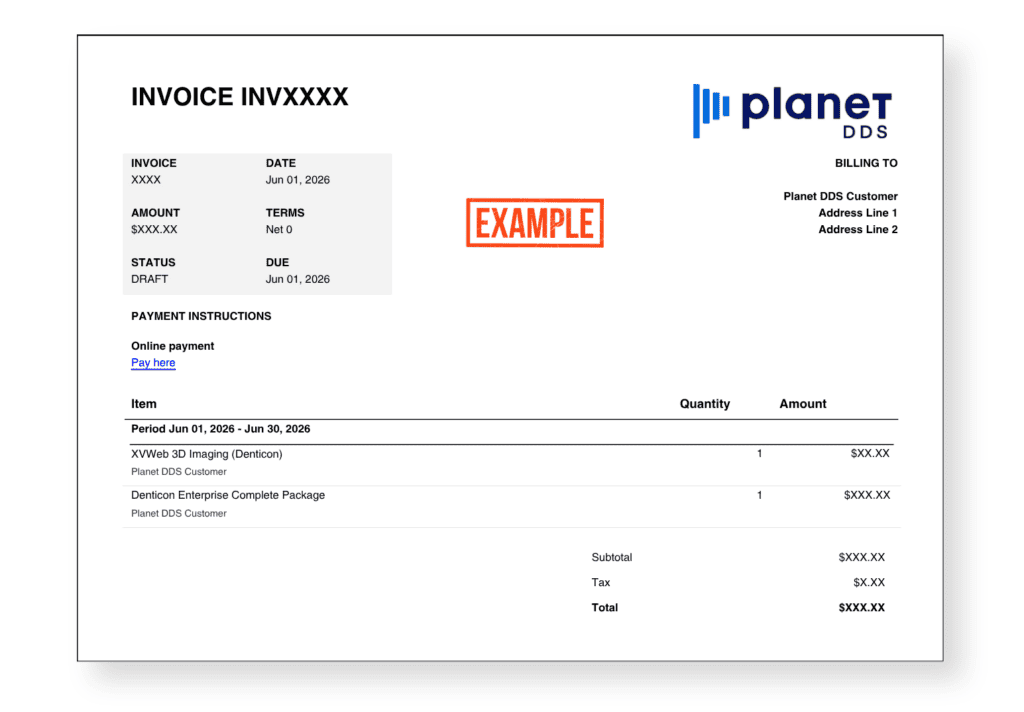
Invoice copies are sent by email You’ll receive a copy of every invoice at the email address on file. Auto-charge customers won’t see a payment link—just the invoice. Non-auto-charge customers will receive a secure payment link alongside their invoice.
*New Client Payment Portal coming soon!
A new Client Payment Portal is on the way
We’re building a new and improved Client Payment Portal to make it easier to manage your account, view invoices, and more. The old client portal is no longer active as of May 1, 2026. We’ll reach out as soon as the new portal is available.
Frequently asked questions
Q: How do I know if I have auto-charge enabled?
If you set up a default payment method when you first signed up, auto-charge is likely enabled. When you receive a billing email, it will contain only a copy of your invoice—no payment link.
Q: Where do billing emails come from?
A: All billing emails come from [email protected]. We’d recommend adding this address to your contacts so your invoices don’t accidentally land in spam.
Q: I have auto-charge. Do I ever need to update my payment method?
A: Only if your card changes—for example, if it expires or is replaced. If you need to update your payment details, please reach out through our support portal and our team will help you get that sorted.
Q: Is there a Client Payment Portal where I can view my invoices?
A: We’re building a new and improved Client Payment Portal and will notify you as soon as it’s available. In the meantime, copies of all invoices are sent directly to your email on file.
Q: Why does my invoice show Planet DDS branding?
A: All invoices across our products are issued under Planet DDS branding, including for Cloud 9 customers. If yours looks a little different than you remembered, that’s the reason—everything else about your billing remains the same.
Q: How do I get help with a billing question?
A: Submit a ticket through our Zendesk Support Portal by clicking “Submit a Request.” Please remember to include your Customer ID and/or Invoice Number so we can look into things quickly. We aim to respond within 72 hours. Please note that the [email protected] inbox is not monitored—the support portal is the best way to reach us.
Still not sure? We’re happy to help.
Our team is ready to answer any billing questions. Submit a request through our support portal and include your Customer ID and/or Invoice Number so we can look into things quickly. We aim to respond within 72 hours.